Welcome, Developers & Engineers!We’re excited to have you here. This space is built for creators, problem-solvers, and tech enthusiasts like you. Whether you’re exploring projects, diving into code, or just visiting a site that speaks your language, you’re in the right place. In this blog, you will gain insightful knowledge of the AS608 Optical Fingerprint Reader Module. Moreover, understanding the basics of the AS608 can greatly enhance your biometric security and identification projects. So, let’s get started.
What is AS608 Optical Fingerprint Reader Module?
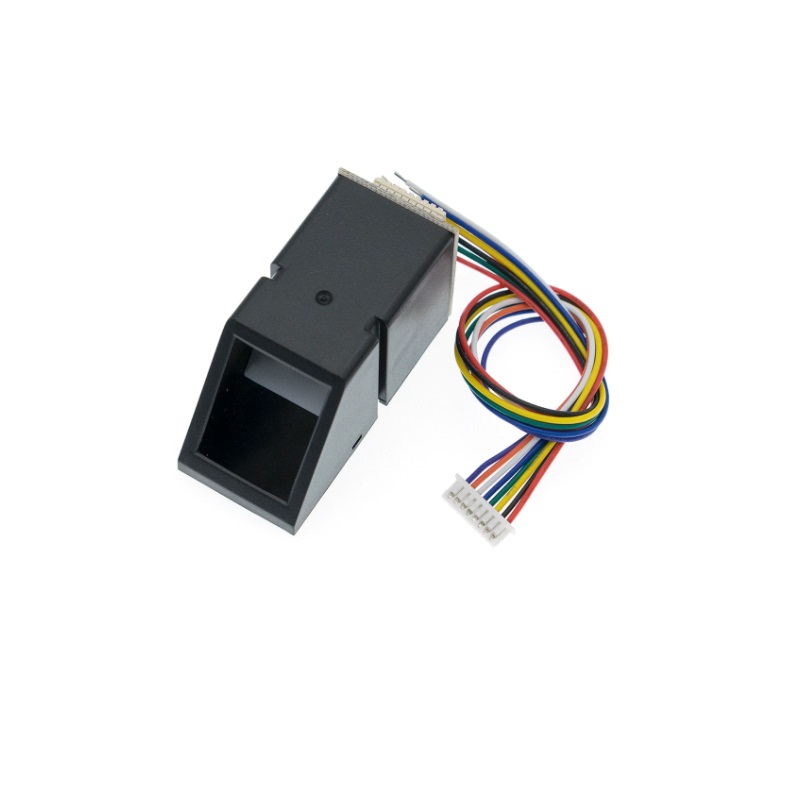
The AS608 is a high-performance optical fingerprint sensor module that captures, processes, and stores fingerprint images. Consequently, it is widely used in Arduino and microcontroller projects for biometric authentication, access control, and attendance systems. Manufactured by Grow (or similar OEM), this module integrates an optical sensor, DSP processor, and flash memory. Therefore, it communicates via UART (serial) protocol, making it easy to interface with microcontrollers like Arduino, ESP32, or Raspberry Pi. Additionally, it supports fingerprint enrollment, matching, and storage of up to 127-1000 templates (depending on version).
Working Principles of AS608 Fingerprint Reader Module?

Fingerprint Capture: First, the user places a finger on the optical prism. As a result, built-in LEDs illuminate the finger, and the CMOS sensor captures a high-resolution image of the fingerprint ridges and valleys.
Image Processing: Moreover, the onboard DSP converts the image into a digital feature template (minutiae points like ridge endings and bifurcations). Consequently, these templates (not raw images) are stored in flash memory.
Matching and Verification: In addition, during verification, a new fingerprint is compared against stored templates using a 1:N search or 1:1 match. Therefore, it provides fast and reliable identification.
Communication: Furthermore, the module uses simple serial commands (packet-based protocol) for enrollment, search, delete, and template management.
Hardware Overview of AS608 Fingerprint Reader Module?
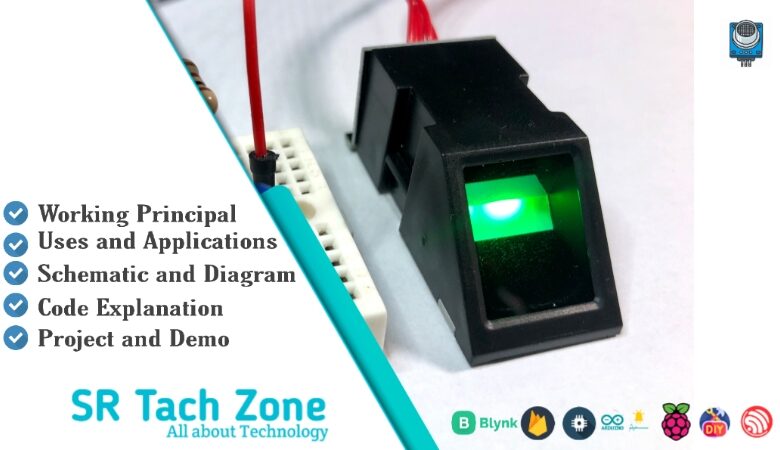
The AS608 module is a small blue board with an optical sensor window (prism), UART interface, status LEDs, and touch detection.
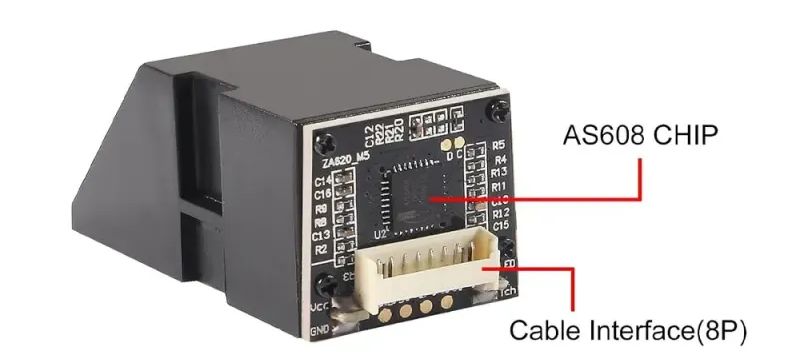
The optical sensor is scratch-resistant and durable. As a result, it works reliably even with dry or slightly wet fingers.
Supporting Circuitry: Additionally, it includes a 3.3V regulator (but logic is 3.3V – use level shifter for 5V boards). Consequently, connection requires only four wires: VCC, GND, TX, RX.
Technical Specifications of AS608 Fingerprint Reader Module?
- Function: Fingerprint enrollment, verification, identification, and storage.
- Sensor Type: Optical (CMOS).
- Image Resolution: 500 DPI.
- Template Storage: Up to 127-1000 templates (model dependent).
- Search Time: <1 second (1:1000).
- False Acceptance Rate (FAR): <0.001%.
- False Rejection Rate (FRR): <1%.
- Communication: UART (9600-57600 baud, default 57600).
- Operating Voltage: 3.3V (module), logic 3.3V.
- Current Consumption: ~50 mA average, 120 mA peak.
- Pinout: VCC, GND, TX, RX, Touch (wake-up), optional power control.
AS608 Fingerprint Reader Module Pinout?
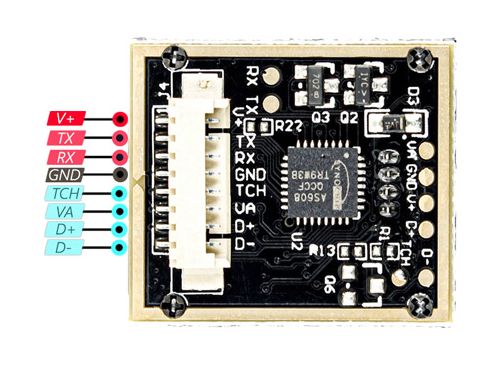
- VCC: Power supply (3.3V)
- GND: Ground
- TX: Transmit (connect to Arduino RX)
- RX: Receive (connect to Arduino TX)
- Touch (optional): Finger detection wake-up
Basic Connections to Arduino:
- VCC: Connect to 3.3V on Arduino (or use level shifter for 5V)
- GND: Connect to Arduino GND
- TX: Connect to Arduino digital pin (via SoftwareSerial RX)
- RX: Connect to Arduino digital pin (via SoftwareSerial TX)
Real Life Uses and Applications of AS608 Fingerprint Reader Module?
The AS608 is perfect for secure and user-friendly biometric projects.
- Door Locks: Fingerprint-based access control systems.
- Attendance Systems: Employee or student time tracking.
- Safe Boxes: Secure storage with fingerprint unlock.
- PC Login: Biometric authentication for computers.
- Voting Machines: Secure voter identification.
- Banking Terminals: Customer verification.
- Smart Home Devices: Personalized control via fingerprints.
Using AS608 Fingerprint Reader Module with Arduino
In this part, we will learn how you can use AS608 with Arduino Uno, Nano, or Mega to enroll and verify fingerprints in just a few minutes – even if you’re a beginner.
What You Need:
- Any Arduino board (Uno recommended)
- AS608 Fingerprint Reader Module
- Jumper wires
- Level shifter (recommended for 5V Arduino)
Wiring Diagram:
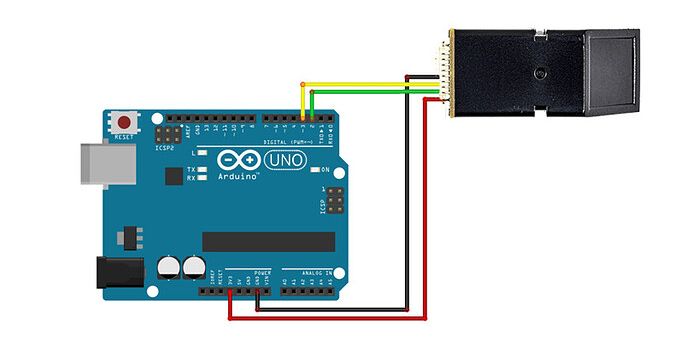
Use SoftwareSerial and 3.3V logic.
Code:
Install “Adafruit Fingerprint” library via Arduino IDE Library Manager before uploading. Here’s a tested enrollment and search code – just copy-paste into your Arduino IDE.
#include <Adafruit_Fingerprint.h>
#include <SoftwareSerial.h>

SoftwareSerial mySerial(2, 3);  // RX, TX

Adafruit_Fingerprint finger = Adafruit_Fingerprint(&mySerial);

void setup() {
  Serial.begin(9600);
  while (!Serial);
  Serial.println("AS608 Fingerprint Sensor Ready!");

  finger.begin(57600);

  if (finger.verifyPassword()) {
    Serial.println("Found fingerprint sensor!");
  } else {
    Serial.println("Sensor not found!");
    while (1);
  }

  finger.getTemplateCount();
  Serial.print("Sensor contains "); Serial.print(finger.templateCount); Serial.println(" templates");
}

void loop() {
  int id = getFingerprintIDez();
  if (id != -1) {
    Serial.print("Match found! ID: "); Serial.println(id);
  }
  delay(50);
}

// Add the library functions getFingerprintEnroll() and getFingerprintIDez() for full use
Credit: This example code is adapted from the official examples in the Adafruit Fingerprint library (compatible with AS608). Library available here: https://github.com/adafruit/Adafruit-Fingerprint-Sensor-Library
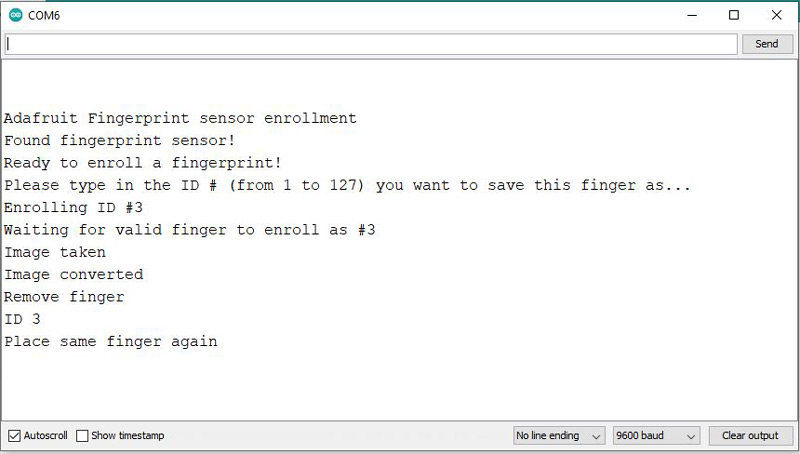
After uploading, open Serial Monitor (9600 baud). Follow prompts to enroll fingers (use library enroll example first), then place finger for verification – you’ll see match results!
Note: Use 3.3V logic (level shifter for Uno). Enroll multiple scans per finger for reliability. Moreover, clean the sensor window and press firmly but gently for best results.
Wrapping up
In this post, we’ve covered all the fundamental aspects of the AS608 Optical Fingerprint Reader Module. We trust that the information provided has been clear and insightful. Feel free to ask any questions you may have about this topic in the comment section below. We are here to help and provide additional clarification as needed.