What is TTP223 Touch Sensor ? & How Does It Work?
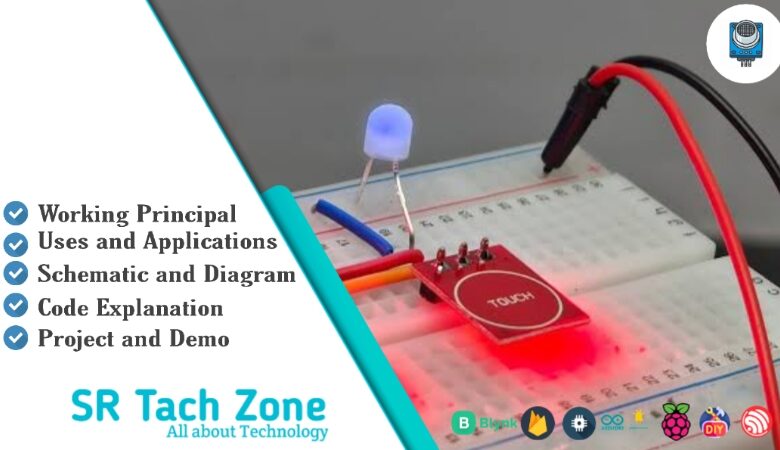
Welcome, Developers & Engineers! We’re excited to have you here. This space is built for creators, problem-solvers, and tech enthusiasts like you. Whether you’re exploring projects, diving into code, or just visiting a site that speaks your language, you’re in the right place. In this blog, you will gain insightful knowledge of the TTP223 Touch Sensor Module. Moreover, understanding the basics of the TTP223 can greatly enhance your touch-controlled and interactive projects. So, let’s get started.
What is TTP223 Touch Sensor Module?
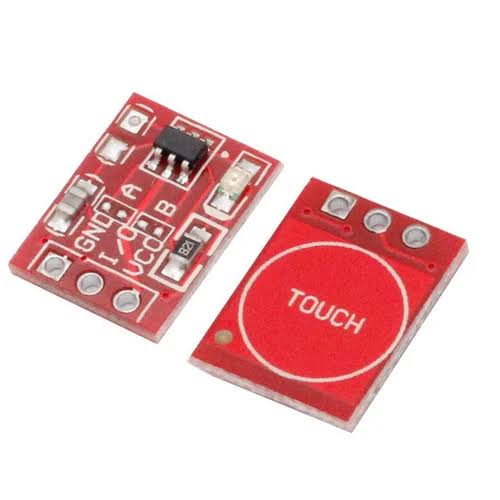
The TTP223 is a low-cost, single-channel capacitive touch sensor module that detects human touch through non-conductive materials like glass or plastic. Consequently, it is widely used in electronics projects as a replacement for mechanical buttons. Manufactured by TonTek, this module provides a digital output that toggles or pulses when the touch pad is touched. Therefore, it is perfect for touch switches, control panels, and interactive interfaces with microcontrollers like Arduino, ESP32, or Raspberry Pi. Additionally, it features adjustable sensitivity and two operating modes (toggle or momentary).
Working Principles of TTP223 Touch Sensor Module?
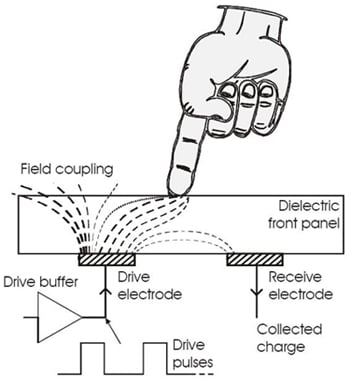
Capacitive Sensing: First, the TTP223 uses a capacitive sensing technique. The touch pad acts as one plate of a capacitor, with your finger as the other plate when touched. As a result, touching increases the capacitance due to the human body’s electrical properties.
Detection and Output: Moreover, the onboard IC continuously monitors this capacitance change. When it exceeds the set threshold, the output pin goes HIGH (or toggles state). Consequently, an onboard LED usually lights up to indicate touch detection.
Mode Selection: In addition, jumper settings allow two modes: momentary (output HIGH only while touched) or toggle (output toggles on each touch). Furthermore, a sensitivity pad or jumper adjusts detection range (up to ~10mm through material).
Hardware Overview of TTP223 Touch Sensor Module?
The TTP223 module is a tiny red or blue board with the TTP223 IC, touch pad (copper area), configuration jumpers, LED, and three/four pins. Most versions have two jumpers: A (toggle mode) and B (momentary mode). As a result, you can configure behavior without code changes.
Supporting Circuitry: Additionally, it includes a stable oscillator and low-power design for reliable operation.
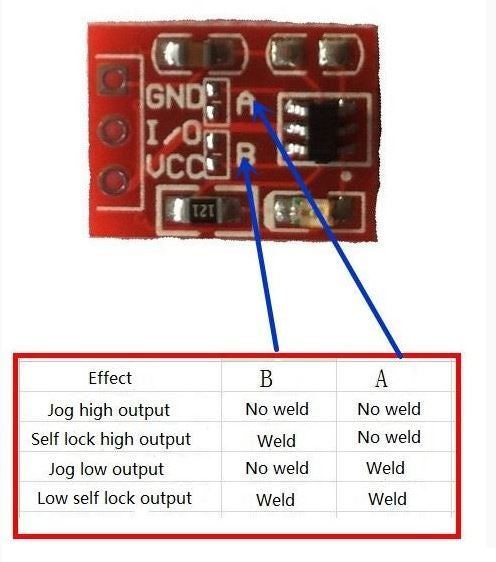
Consequently, it’s extremely simple – just power and one digital input pin needed.
Technical Specifications of TTP223 Touch Sensor Module?
- Function: Single-channel capacitive touch detection.
- Output: Digital HIGH/LOW (active high).
- Operating Modes: Momentary or Toggle (via jumper).
- Touch Sensitivity: Adjustable (up to 10mm through non-conductive cover).
- Operating Voltage: 2.0V to 5.5V DC (commonly 3.3V or 5V).
- Current Consumption: <10 µA (quiescent), ~2 mA when touched.
- Response Time: ~60 ms (active mode), ~220 ms (low power).
- Pinout: VCC, GND, SIG (signal output), optional I/O for mode.
- Board Size: Approximately 15mm x 11mm.
TTP223 Touch Sensor Module Pinout?
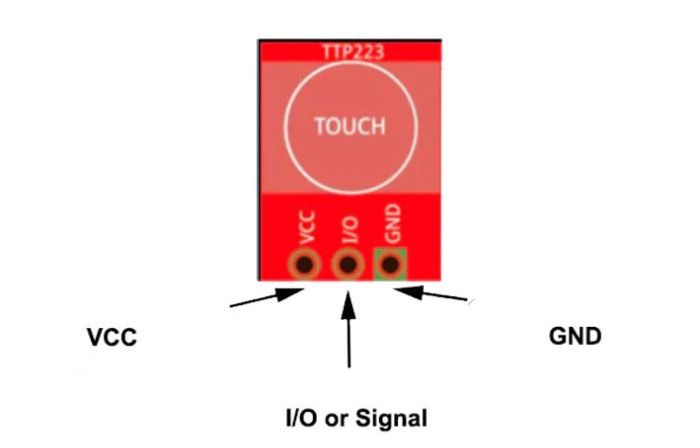
- VCC: Power supply (2V-5.5V)
- GND: Ground
- SIG (I/O): Digital output (HIGH when touched)
Basic Connections to Arduino:
- VCC: Connect to 5V or 3.3V on Arduino
- GND: Connect to Arduino GND
- SIG: Connect to any digital pin (e.g., pin 2)
Real Life Uses and Applications of TTP223 Touch Sensor Module?
The TTP223 is ideal for creating modern, touch-based interfaces in hobby and commercial projects.
- Touch Buttons/Switches: Replaces mechanical buttons in lamps, appliances, or control panels.
- Interactive Displays: Touch controls behind acrylic or glass panels.
- Water-Resistant Interfaces: Works through plastic for bathroom or kitchen devices.
- Security Panels: Keypad-like touch inputs.
- Wearable Projects: Touch activation on clothing or accessories.
- Smart Home Controls: Wall-mounted touch switches.
- Toys and Games: Touch-sensitive triggers or buttons.
Using TTP223 Touch Sensor Module with Arduino
In this part, we will learn how you can use TTP223 with Arduino Uno, Nano, or Mega to detect touch in just a few minutes – even if you’re a beginner.
What You Need:
- Any Arduino board (Uno recommended)
- TTP223 Touch Sensor Module
- Jumper wires
- Breadboard (optional)
Wiring Diagram:
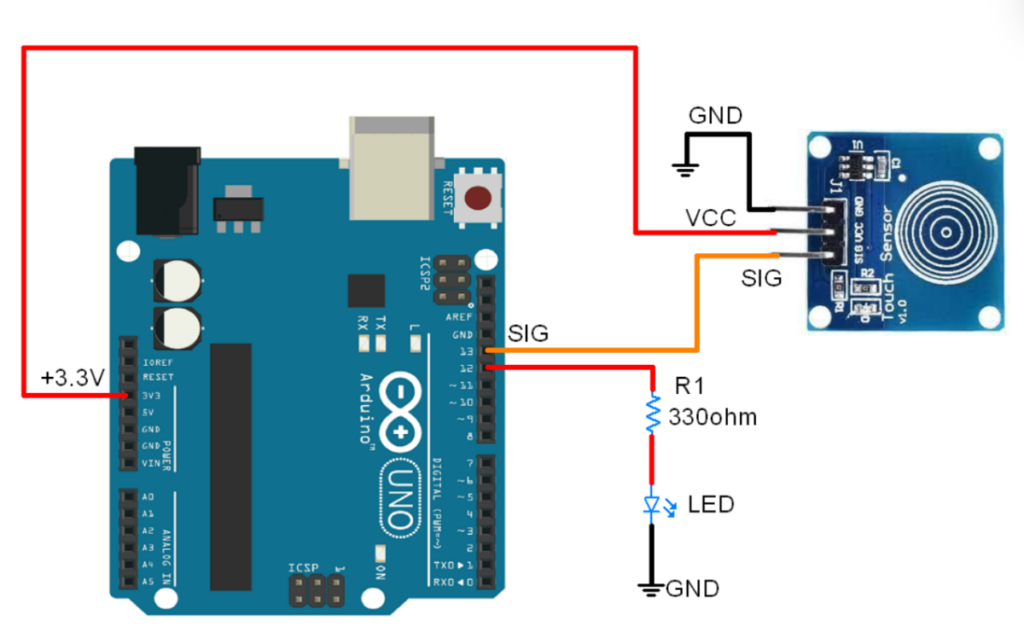
Connect directly – set jumper for momentary or toggle mode as needed.
Code:
No special library is required – just use digitalRead(). Here’s a tested simple code – just copy-paste into your Arduino IDE.
#define TOUCH_PIN 2    // SIG to digital pin 2
#define LED_PIN 13     // Built-in LED

void setup() {
  pinMode(TOUCH_PIN, INPUT);
  pinMode(LED_PIN, OUTPUT);
  Serial.begin(9600);
  Serial.println("TTP223 Touch Sensor Ready!");
}

void loop() {
  int touchState = digitalRead(TOUCH_PIN);

  if (touchState == HIGH) {
    Serial.println("Touch Detected!");
    digitalWrite(LED_PIN, HIGH);  // Turn on LED
  } else {
    digitalWrite(LED_PIN, LOW);   // Turn off LED (momentary mode)
  }

  delay(100);  // Small delay for stability
}
Note: This is a basic example using standard Arduino functions – no external library needed.
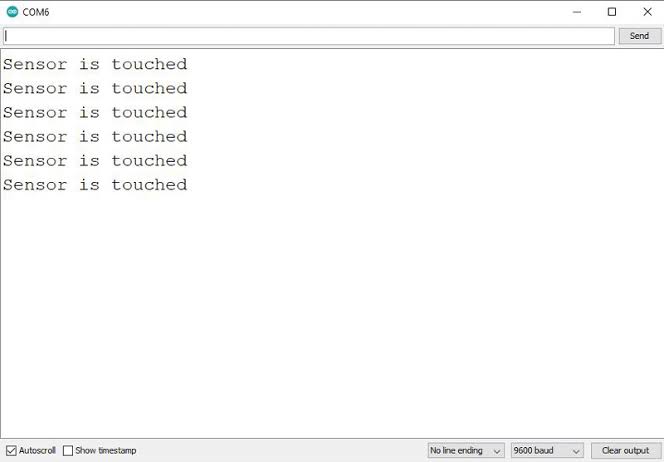
After uploading, touch the pad – you’ll see “Touch Detected!” in Serial Monitor (9600 baud), and the LED will light up (in momentary mode). In toggle mode, output stays HIGH after each touch!
Note: Set jumper A for toggle, remove for momentary. Cover with thin plastic/glass for hidden touch buttons. Moreover, avoid conductive materials or water on the pad for reliable operation.
Wrapping up
In this post, we’ve covered all the fundamental aspects of the TTP223 Touch Sensor Module. We trust that the information provided has been clear and insightful. Feel free to ask any questions you may have about this topic in the comment section below. We are here to help and provide additional clarification as needed.